Timeguard FST17A Bedienungsanleitung Seite 1
Stöbern Sie online oder laden Sie Bedienungsanleitung nach Uhr Timeguard FST17A herunter. Timeguard FST17A User Manual Benutzerhandbuch
- Seite / 12
- Inhaltsverzeichnis
- LESEZEICHEN
Bewertet. / 5. Basierend auf Kundenbewertungen

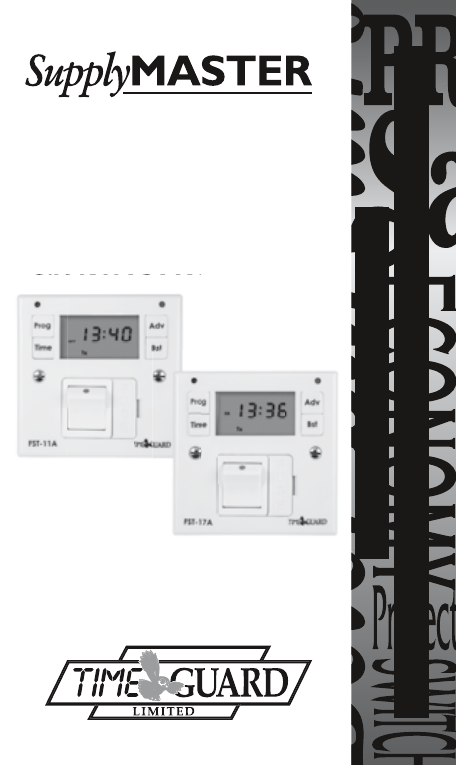
INSTALLATION & OPERATING
INSTRUCTIONS
FUSED SPUR
TIMESWITCH
Cat No. FST11A – 24 Hour
Cat No. FST17A – 7 Day
Installation & Operating
Instructions
Cat No. FST17A – 7 Day
11. Specifications
Inhaltsverzeichnis
Seite 1 - TIMESWITCH
INSTALLATION & OPERATINGINSTRUCTIONS FUSED SPUR TIMESWITCH Cat No. FST11A – 24 HourCat No. FST17A – 7 DayInstallation & OperatingInstructionsC
Seite 2 - Contents:
9. Programming the ON/OFF Times – FST11A only10. Operating Mode10.1 Override until Next Program Change10.2 1 and 2 Hour BoostThe FST11A is similar
Seite 3 - 3. Applications
FUSED SPUR TIMESWITCH Cat No. FST11A – 24 HourCat No. FST17A – 7 Day Installation & Operating Instructions11. SpecificationsThis product complie
Seite 4 - 4. Installation
HELPLINE020-8450-0515or email [email protected] a product brochure please contact:Timeguard Ltd.Victory Park, 400 Edgware Road,London NW2 6ND
Seite 5
Status LEDReset button (recessed)Sets programmesSets date and timeDisplay (back lit for 30 seconds when any button is pressed)Double pole switchBS 13
Seite 6
2. BatteryThe unit has an in-built non-replaceable, rechargeable battery, which will keep the programmed times during power down situations for up to
Seite 7 - FST17A only
4. Installation5. FuseUse the appropriate BS 1362 fuse for the load. The unit is supplied with a suitable 13A fuse.The unit is designed to replace an
Seite 8
7. Setting the Date and Time of Day7.1 Initially Setting the Date and Time of DayPress the ‘Time’ button and hold for approx. 2 seconds. Whilst holdin
Seite 9
Press the ‘Time’ button and the day digits will flash:–Use ‘Adv’ or ‘Bst’ to set the day.Press the ‘Time’ button and the hour digits will flash:–Use ’
Seite 10 - 10. Operating Mode
7.2 Modifying the Date and Time of DayNormally the only change required will be to the time of day minutes, in which case press and hold ‘Time’ for 2
Seite 11
Once the desired day grouping is selected, press ‘Prog’ to move onto programming ON/OFF times.Display will show prog 1 ON, and the hour digits flashin
Seite 12 - 020-8450-0515
Press ‘Prog’ and hold for approx. 2 seconds. Whilst holding, the word ‘HOLD’ will appear in the top left hand corner of the display. After 2 seconds
Verwandte Produkte und Handbücher für Uhr Timeguard FST17A
Uhr Timeguard TS900B Bedienungsanleitung
 (6 Seiten)
(6 Seiten)
Uhr Timeguard NTM01 Bedienungsanleitung
(6 Seiten)
(6 Seiten)
Uhr Timeguard NTM02 Bedienungsanleitung
(12 Seiten)
(12 Seiten)
Uhr Timeguard TR 672 top Bedienungsanleitung
(12 Seiten)
(12 Seiten)
Uhr Timeguard EMU17 Bedienungsanleitung
(7 Seiten)
(7 Seiten)
Uhr Timeguard EMU56 Bedienungsanleitung
(12 Seiten)
(12 Seiten)
Uhr Timeguard PB05 Bedienungsanleitung
(8 Seiten)
(8 Seiten)
Uhr Timeguard EL17 Bedienungsanleitung
(12 Seiten)
(12 Seiten)
Uhr Timeguard TR 608 top2 Bedienungsanleitung
(24 Seiten)
(24 Seiten)
Uhr Timeguard TR 622 top2 Bedienungsanleitung
(14 Seiten)
(14 Seiten)
Uhr Timeguard LUNA 108 Bedienungsanleitung
 (1 Seiten)
(1 Seiten)
Uhr Timeguard LUNA 109 Bedienungsanleitung
(8 Seiten)
(8 Seiten)
Uhr Timeguard LUNA 110 Bedienungsanleitung
(8 Seiten)
(8 Seiten)
Uhr Timeguard TR 644 top2 Bedienungsanleitung
(36 Seiten)
(36 Seiten)
Uhr Timeguard LUNA 111 top2 Bedienungsanleitung
(14 Seiten)
(14 Seiten)
Uhr Timeguard E169S Bedienungsanleitung
(1 Seiten)
(1 Seiten)
Uhr Timeguard ELU56 Bedienungsanleitung
(2 Seiten)
(2 Seiten)
Uhr Timeguard E269H Bedienungsanleitung
(2 Seiten)
(2 Seiten)
© 2020, manymanuals.de. Alle Rechte vorbehalten. | 0.063 s |
 Manymanuals.com
 Manymanuals.de
 Manymanuals.fr
 Manymanuals.it
 Manymanuals.pl
 Manymanuals.cz
 Manymanuals.es
 Manymanuals-pt.com
Kommentare zu diesen Handbüchern